Itineraries & quotes
Itineraries clients say yes to.
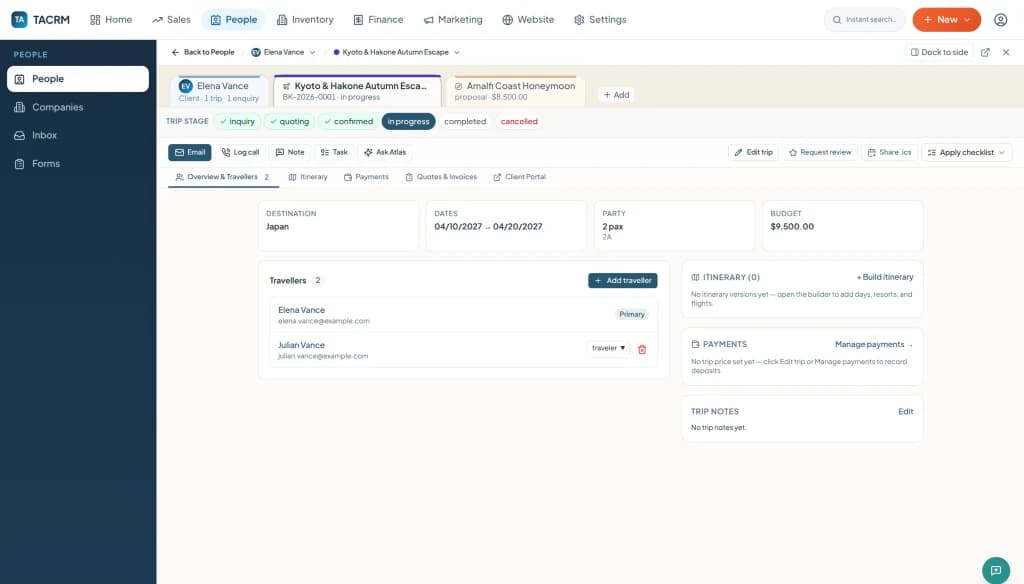
Build a day-by-day itinerary, keep every version, and send a quote clients can accept online. Or ask your AI assistant to draft the first version from the client’s email.

Day by day
stays, transfers and activities in order
Every version
so you can always go back to Option A
One click
for clients to accept a quote
Here it is
Sound like your week?
What gets in the way today
Rebuilding trips in Word and Canva
Every change means another document, and by the time the client replies you are not sure which one is current.
Losing the version the client liked
They loved the first idea, then the third. Without saved versions you are rebuilding from memory.
Not knowing if the quote was seen
You send it, and then you wait, and then you wonder whether to chase.
What you can do
What you get
Day-by-day builder
Add accommodation, transfers, activities and notes to each day, with descriptions and practical details.
Every version saved
Duplicate an itinerary into a new version when plans change. Mark the one the client chose, and decide which versions they can see.
Quotes clients can accept online
OnlineSend a priced quote by email. Clients accept or decline with a click, and you can see when it was sent, opened and answered.
Branded PDFs
Itineraries and quotes as clean PDFs, with your agency’s name and details.
A head start from your AI assistant
Paste in a client’s email or a supplier’s quote and get a draft itinerary to edit.
All on one booking
Travellers, quotes, invoices and payments stay linked to the trip, so you never retype anything.
How it works
How it works, in four steps
- Step 01
Draft it
Start from scratch, copy an earlier trip, or have a first draft made for you.
- Step 02
Refine it
Make changes as the client replies, keeping each version.
- Step 03
Send the quote
Email a quote and see when it is opened and accepted.
- Step 04
Share it
Clients see the confirmed itinerary on their own trip page.
Guides in our Help Center
Goes well with
Itineraries & Quotes FAQ
Common questions
Can I keep more than one version of an itinerary?
Yes. Create a new version whenever plans change, mark the agreed one as selected, and choose which versions your client can see.
How does a client accept a quote?
They open the link in your email, review the quote and accept or decline online. There is no account to create, and you see their answer straight away.
Can I send itineraries as PDFs?
Yes. Itineraries and quotes download as branded PDFs, and clients can download them from their trip page.
Try it with your own clients
Start free with a sample trip, or book a demo and we will show you around.