Your clients’ trip page
One private link for everything about their trip.
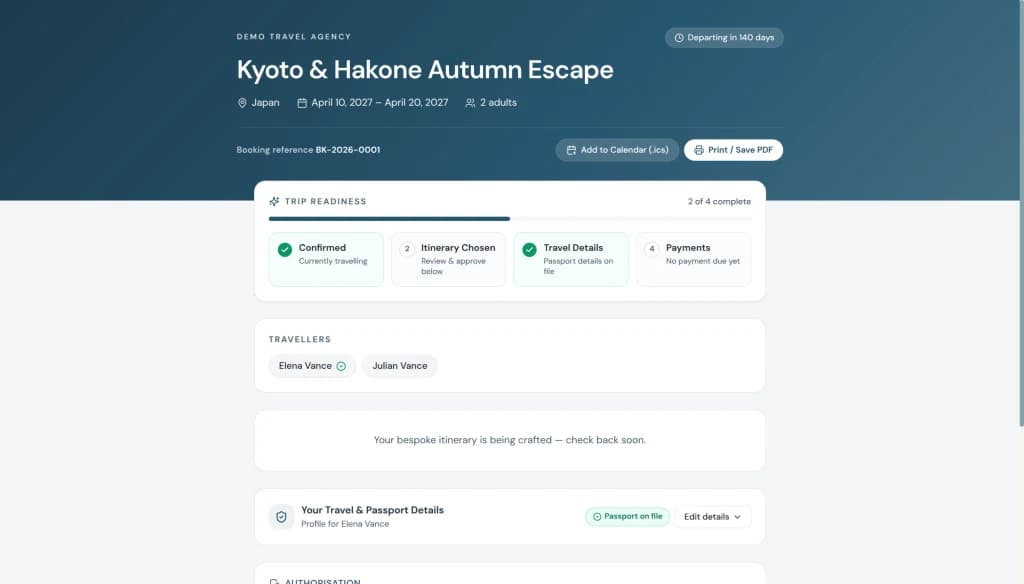
Send clients a link to their own trip page with the itinerary, documents, messages, payments and booking confirmation. No password, and it carries your agency’s name.

No password
a private link that works on any phone or computer
On record
who confirmed the booking, what they agreed to and when
Reviews
ask for one in a click once they are home
Here it is
Sound like your week?
What gets in the way today
Clients keep asking for their documents
Where is my itinerary? Can you resend the voucher? Every message is a small interruption.
Chasing signatures and deposits
A PDF in one email, a form in another, a payment link in a third. It does not feel like the service you promised.
Great trips that never become reviews
You mean to ask, and then the next departure arrives.
What you can do
What you get
Their itinerary and documents
Clients see the itinerary versions you choose to share, download their PDFs and message your team from the same page.
Clients choose their itinerary
NewWhen you present more than one option, they can look through them and approve the one they want.
How ready they are
A countdown to departure and a short checklist: booking confirmed, itinerary chosen, travel details added, payments done.
Travel details, entered by the client
NewPassport, date of birth, dietary needs, seat preferences and an emergency contact. They go straight onto the client’s record, and only the last digits of a passport number are shown.
Confirm the booking online
Clients agree to your terms by typing their name. We record what they agreed to, and when.
Pay online
Clients pay deposits and balances by card, once you have connected Stripe.
Reviews
Send a review request in one click. Clients give a star rating and a few words, and say whether you can publish it.
How it works
How it works, in four steps
- Step 01
Send the link
With the quote or the booking confirmation.
- Step 02
They confirm and pay
Agree to the terms and pay a deposit, all on one page.
- Step 03
They travel prepared
Itinerary, documents and your messages are a tap away.
- Step 04
They review you
Ask for a review when they are home.
Guides in our Help Center
Goes well with
Client Trip Portal FAQ
Common questions
Do clients need to log in?
No. Each client has a private link to their own trip, and nobody else can open it. There is no account and no password.
What do you record when a client confirms a booking?
The name they typed, the wording they agreed to, the date and time, and the address they used to confirm.
Can I publish the reviews I collect?
Yes. Each review comes with a tick-box where the client says whether you may publish it.
Try it with your own clients
Start free with a sample trip, or book a demo and we will show you around.