Email, calendar & reminders
Nothing slips, even in your busiest season.
Connect the email you already use, get warned before a passport becomes a problem, and follow the same checklist on every trip.

Passport alerts
a warning before the six-month rule catches anyone out
Checklists
tasks appear as each trip moves forward
Your calendar
departures and events on your phone
Here it is
Sound like your week?
What gets in the way today
The passport nobody checked
Many countries want six months’ validity. A reminder in your head is not a system.
Everyone has their own checklist
Without a standard list, a final-payment reminder or a supplier reconfirmation gets forgotten.
Emails that live outside the booking
The answer is in an inbox, and the trip is somewhere else.
What you can do
What you get
Your email, beside the client
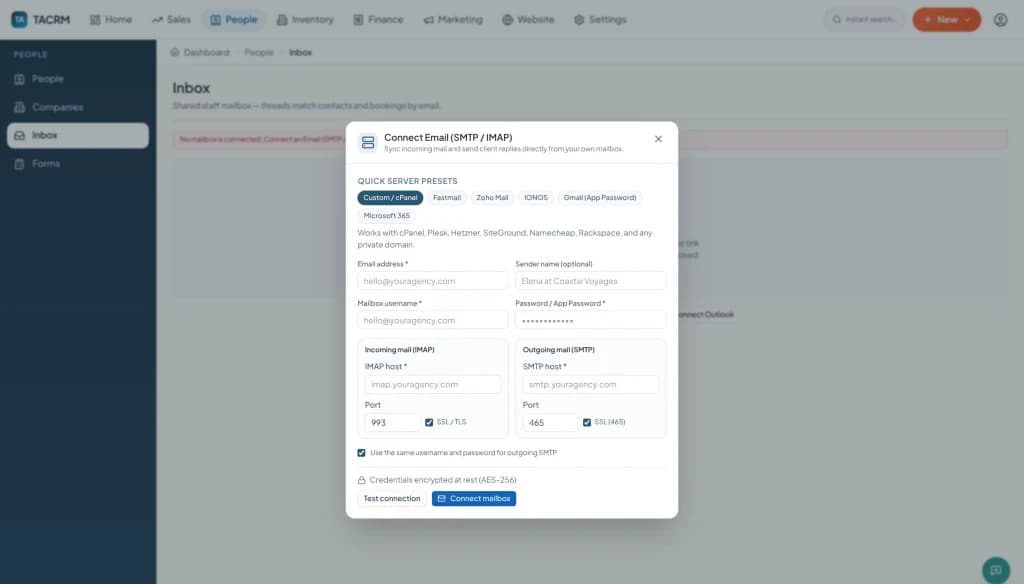
Connect Gmail, Outlook or any other email account. Messages are matched to the right client and trip, and you reply from your own address.
Passport and birthday reminders
See upcoming passport expiries, including the six-month window, and client birthdays on your dashboard.
Checklists that fill themselves in
Set up your standard tasks once, with due dates set around booking, departure and return. They are added as each trip moves forward.
Calendars
Departures, returns and team events, including repeating ones, which you can subscribe to in Google, Apple or Outlook.
Who can see what
Choose what each person on your team can see and change, from finance to bookings.
Kept in Europe
Hosted in Germany and Finland, with each agency’s information kept separate.
How it works
How it works, in four steps
- Step 01
Connect your email
Client conversations sit beside each booking.
- Step 02
Set up your checklists
The same steps on every trip, whoever is handling it.
- Step 03
Subscribe to your calendar
Departures and events in the calendar you already use.
- Step 04
Let the reminders work
Passport and birthday alerts appear before they matter.
Guides in our Help Center
Goes well with
Email, Calendar & Reminders FAQ
Common questions
Which email accounts can I connect?
Gmail, Outlook and any other email account, including ones on your own domain. Your details are stored encrypted.
Can I see my trips in my own calendar?
Yes. Subscribe to your trip and team calendars in Google, Apple or Outlook and they stay up to date.
Try it with your own clients
Start free with a sample trip, or book a demo and we will show you around.