Marketing & social
Promote your agency from the same place you book.
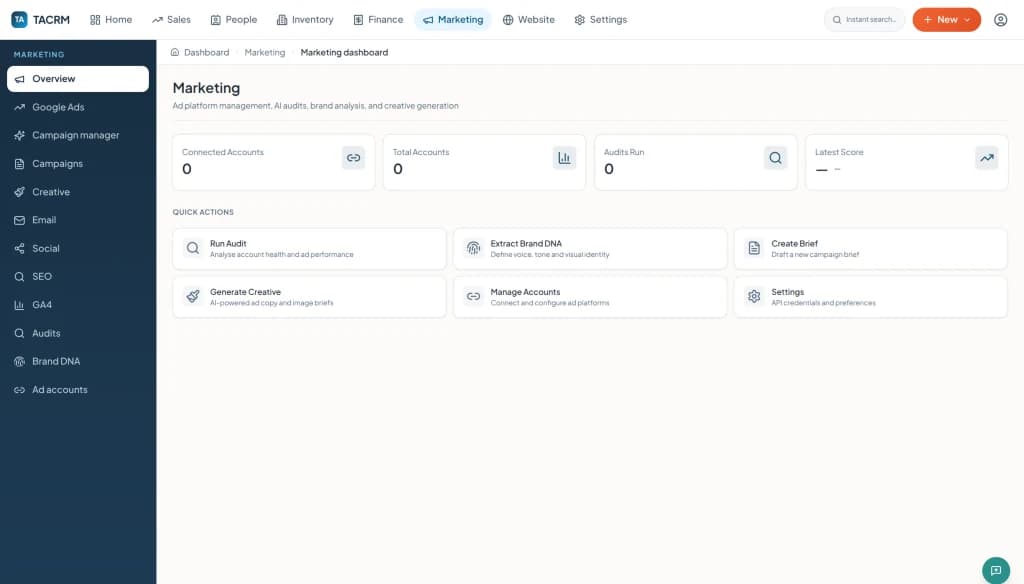
See how your website is doing, post to your social channels, send newsletters, and get help writing articles from your AI assistant.

Know what works
website visitors and ad results beside your enquiries
Posts and articles
schedule social posts and write blogs with help
Your choice
a blog we host for you, or your own WordPress site
Here it is
Sound like your week?
What gets in the way today
Marketing tools pile up
A scheduler for social, a platform for newsletters and a stats dashboard. None of them know your destinations or your bookings.
Writing takes hours
You know the destinations inside out, but finding time between client calls to write about them is hard.
Not knowing what brings enquiries in
Stats in one place, enquiries in another, and no way of connecting them.
What you can do
What you get
Website stats
Connect Google Analytics to see your visitors and your most-read pages, beside your enquiries.
Google Ads
Connect your account to see results and build campaigns for your destinations.
Social posting
Connect Instagram, Facebook and LinkedIn and schedule posts, including your new blog articles.
Articles, drafted for you
AtlasAsk your AI assistant for a first draft of a destination guide or a resort spotlight, in your agency’s voice. You edit it before it goes anywhere.
Newsletters and your brand voice
Save how your agency sounds, so newsletters, articles and posts read like you.
Publish where you like
On a blog we host for you, or on your own WordPress site.
How it works
How it works, in four steps
- Step 01
Save your brand voice
Your tone, your destinations and your clients.
- Step 02
Draft an article
Turn a new resort or an offer into an article and a few posts.
- Step 03
Publish
On your blog or WordPress, with matching social posts scheduled.
- Step 04
See what worked
Check your website stats and watch the enquiries arrive.
Guides in our Help Center
Goes well with
Marketing & Social FAQ
Common questions
Can I post to Instagram and Facebook from here?
Yes. Connect your accounts under Marketing and schedule posts, including links to your new articles.
Do I have to use WordPress for my blog?
No. You can publish on a blog we host for you, or on your own WordPress site. It is up to you.
Can I connect Google Analytics and Google Ads?
Yes. Connect them under Marketing to see your website stats and your ad results.
Try it with your own clients
Start free with a sample trip, or book a demo and we will show you around.