Call booking
Let clients book a call with you.
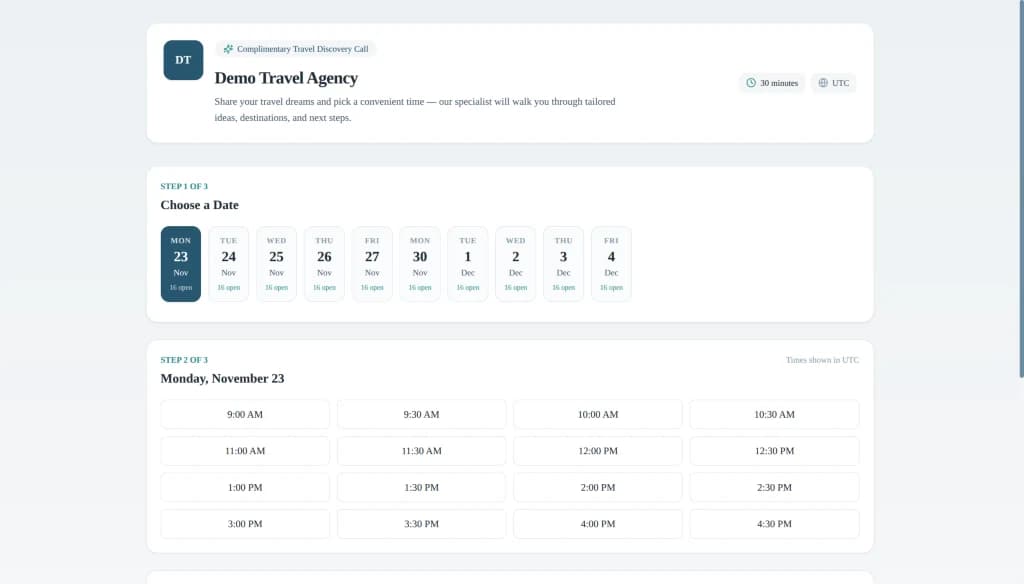
Share one booking page with your agency’s name on it. When someone books, they are added as a contact, the call is in your diary and a new enquiry is waiting for you.

One link
for your website, emails and social profiles
Set up for you
contact, meeting and enquiry created automatically
Calendar invite
clients can add the call to their calendar
Here it is
Sound like your week?
What gets in the way today
The “when are you free?” emails
Booking a 30-minute chat takes four emails and three days, and a keen enquiry cools off.
Retyping callers into your system
You use one tool to book the call and another to remember the client.
What you can do
What you get
Your own booking page
It carries your agency’s name. Clients pick a date and a 30-minute slot, and tell you a little about the trip they have in mind.
Everything set up for you
The contact, the meeting on their record and a new enquiry in your sales list are created the moment they book.
Calendar invites
Clients can add the call to Google Calendar or download it for any other calendar.
Add your link to any email
One click when you are writing to a client or a new enquiry.
How it works
How it works, in four steps
- Step 01
Share your link
On your website, in your emails and on your social profiles.
- Step 02
They pick a time
A date and a 30-minute slot, with no login.
- Step 03
Everything is set up
The contact, the meeting and the enquiry appear.
- Step 04
Plan the trip
Paste your notes from the call and draft the itinerary.
Guides in our Help Center
Goes well with
Call Booking FAQ
Common questions
What happens when someone books a call?
They are added as a contact (or matched to an existing one), the meeting is logged on their record, and a new enquiry appears in your sales list. They can add the call to their calendar.
Can I put the booking page on my own website?
Yes. Link to it from any page, button or email.
Try it with your own clients
Start free with a sample trip, or book a demo and we will show you around.