

Amalfi Coast, Italy
01 / THE ENQUIRY
Turn enquiries into bookings
Website forms and booked calls arrive as contacts with the enquiry already set up, so you can start planning straight away.
From the first enquiry to the final invoice, every client and every trip in one place. Spend your time selling holidays, not chasing paperwork.
Maya & Leo Okafor · Amalfi & Capri · 10n
Client asked for sea-view terrace upgrade
Wilson Family (4) · Kenya Safari · 9n
Child passport expires within 6 months
Trips, emails, calls, notes and documents on one record, with the full history behind it.
A guided path for every sale: itinerary, quote, booking and payment.
Your AI assistant drafts trips from client emails and helps with the writing. You approve everything.
Trip pages, forms, your booking page and invoices all carry your agency’s name.
See it in action
Real screens from My Travel Agency CRM. Pick one to see what it does.
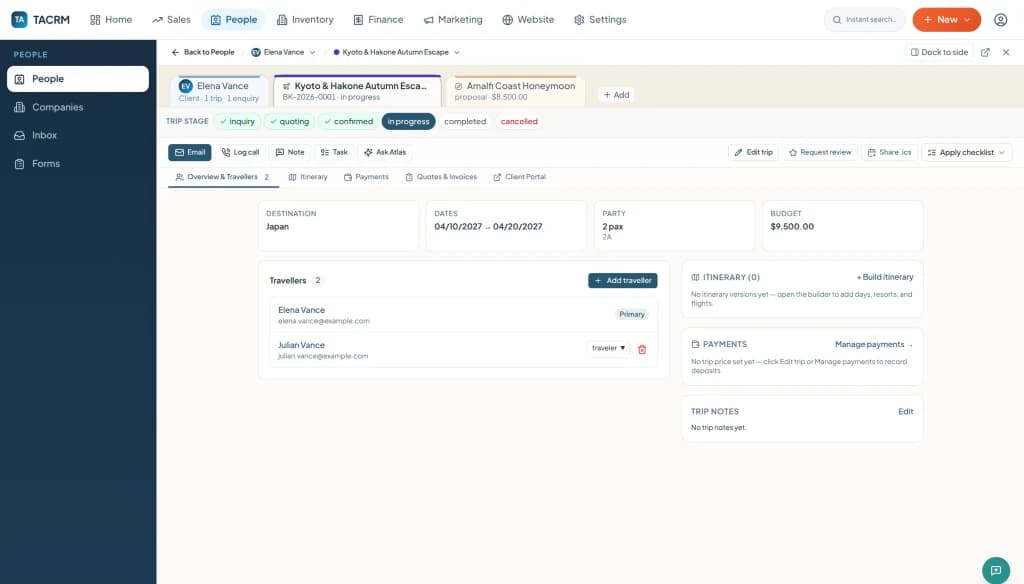
Trips, enquiries, emails, calls and notes on one screen. Reply, log a call or ask Atlas without leaving the client.
How a booking goes
Keep every traveller’s details, trip plans and payments together, so nothing gets lost between the enquiry and the trip home.
01 / THE ENQUIRY
Website forms and booked calls arrive as contacts with the enquiry already set up, so you can start planning straight away.

02 / THE PLAN
Build the itinerary day by day, or let Atlas draft the first version from the client’s email. Then send a quote they can accept online.

03 / THE TRIP
Passport reminders, checklists, payments and a trip page for the client, so nothing is missed between the booking and the flight home.
Fewer tools, fewer headaches
Spreadsheets and notebooks
Instead
Every client, trip and follow-up in one place, with the full history
A separate booking-link tool
Instead
Your own call booking page that sets up the contact and enquiry for you
Itineraries built in Word or Canva
Instead
A day-by-day itinerary builder, with Atlas to draft the first version
Forms and signatures by email
Instead
Online booking confirmation, with a record of what was agreed and when
Separate social, newsletter and stats tools
Instead
Posts, newsletters, website stats and articles beside your bookings
Updating your website by hand
Instead
A WordPress plugin that shows your hotels and packages for you
One trip, start to finish
Click a step to see what happens at each stage of a booking.
Step 01 · Enquiry
A client fills in your form or books a call. They are added as a contact and the enquiry is waiting for you.
Created automatically
Contact, enquiry and calendar entry
What it does
Clients & sales
Trips, emails, calls, notes, preferences and documents on one record, with the full history behind it.
Find out moreItineraries & quotes
Day-by-day itineraries, every version saved, and quotes clients can accept online.
Find out moreMeet Atlas
Turn a client’s email or a supplier quote into a draft trip, and get a head start on emails and articles.
Find out moreYour clients’ trip page
Itinerary, documents, messages, payments and booking confirmation on one private page for each client.
Find out moreCall booking
A booking page for discovery calls that adds the contact, the meeting and the enquiry for you.
Find out moreWebsite & WordPress
Edit a hotel or package once and your WordPress site updates. Website enquiries arrive ready to work.
Find out moreInvoices & payments
Invoices from the booking, card and bank payments matched for you, and commission tracked.
Find out moreEmail, calendar & reminders
Your email beside each client, passport and birthday reminders, and checklists that appear as trips move forward.
Find out moreMarketing & social
Website stats, social posts, newsletters and blog articles, all next to your bookings.
Find out moreYour website
Add a hotel or change an offer once, and your WordPress site shows it. Enquiries from your forms and booked calls arrive as ready-made contacts, so there is nothing to copy across.
Your site, kept up to date
youragency.com
Hotel page
Cliffside hotel, Ravello
Rooms, photos and your offer, from your catalogue.
New enquiry
Priya and Dev, Maldives, 10 nights
Added as a contact, ready to follow up
Call booked
Thursday, 2:00 pm
In your diary, with the enquiry set up
Start with a sample trip and your own clients. Our pricing page has the plans and what each one includes.
For your kind of agency
Already using something else?
Questions
If yours is not here, ask us. We are happy to show you around.
It is the system a travel agency runs on. Your clients, trips, quotes, invoices, payments, email and marketing are in one place, so you stop switching between spreadsheets, inboxes and separate tools. Every client has one record with their full history.
No. Each client gets a private link to their own trip page, where they can see the itinerary, download documents, message you, confirm their booking and pay. There is no password to forget and nothing to install.
Yes. If your site is on WordPress, our plugin shows your hotels, destinations and packages on it and keeps them up to date. Enquiry forms and your call booking page can go on any website. If you do not have a site, you can build one here.
Atlas is your AI assistant. Paste in a client’s email or a supplier’s quote and Atlas drafts the trip. It also helps with emails, summaries and articles. Nothing is saved or sent to a client until you have read it and approved it.
Yes. Connect Gmail, Outlook or any other email account. Messages are matched to the right client and trip, and you reply from your own address.
Yes. You set your agency’s currency, tax name and rate, time zone and business details once, and they are used on your quotes, invoices and PDFs.
In Europe. We are run from Berlin and host in data centres in Germany and Finland. Each agency’s information is kept separate from every other agency’s, and you choose what each person on your team can see.
Every plan, and what it includes, is on our pricing page. You can try everything free first, with no card needed.
Start your free trial with a sample trip to explore, or book a demo and we will show you around.